A quote request lands in your inbox and it is one line long: "I want to redo the bathroom." You cannot price that. You have to write back, wait, follow up if the client goes quiet, and your first price goes out three days later, when they already have two other offers.
The client is rarely the problem. The form is: it did not ask the questions you need to price the job, or it asked them in a way that invites a quick, short answer. This article covers the questions that belong in a quote request form, why each one matters, and how to word them so the answer is actually useful.
What a quote needs to know
Before choosing fields, list what moves your price. For a contractor, it is the surface, the kind of work, site access. For a photographer, the date, the place, the hours on site, the number of people. For a developer, the scope, the deadline, what already exists. Every question in the form should map to one of those factors. If you cannot say which price factor a question serves, remove it.
The UK government's design system gives the same rule for any form: "you should make sure you know why you're asking every question and only ask users for information you really need". A quote form is the textbook case: every extra field costs a little patience, and your client's patience is limited.
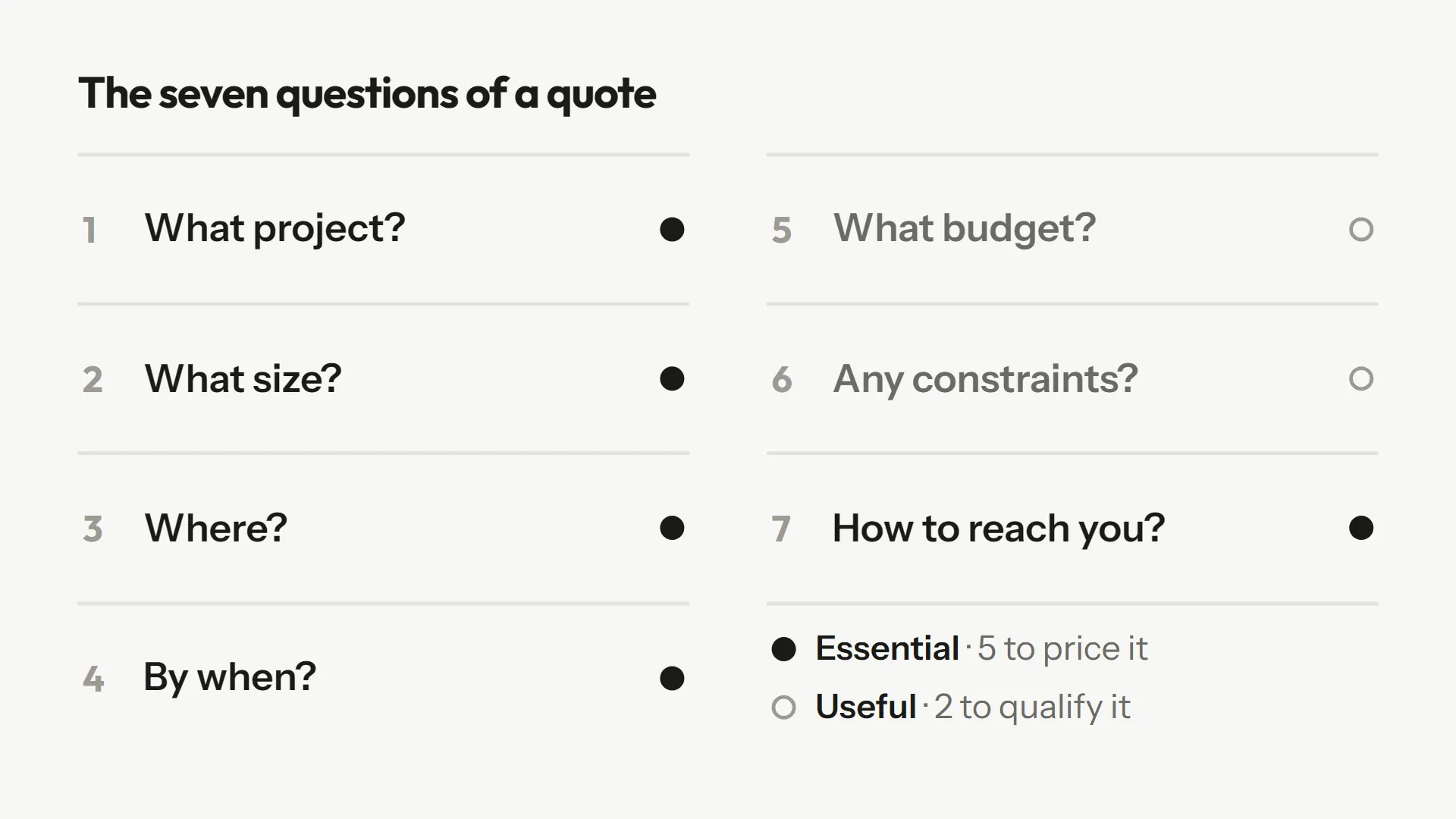
The seven questions of a quote request form
1. What is the project?
This is the most important question and the one most often asked badly. "Describe your project" gets you "A website" or "Redo my bathroom." Start with a closed choice that sets the category (bathroom, kitchen, other room), then leave an open question for the details. The closed choice sorts, the open question specifies: both have a job (see open vs closed questions).
2. What size, what quantity?
Square metres, number of guests, number of pages, volume to deliver: it is the first price factor for most trades. Ask for a number, with the unit in the label. A numeric field prevents "quite big" and "a fair few people." If the client does not know, give them a way out ("I don't know") rather than blocking the form: a rough estimate beats an abandoned form.
3. Where?
A postcode or a city is enough to know whether you work there and what travel costs. No need for the full address at this stage; it comes with the signed quote. The fewer personal details you collect early, the better, and it is also a GDPR principle: data must be "adequate, relevant and limited to what is necessary" (Article 5(1)(c)).
4. For when?
The deadline changes your price and your answer: a job "before March" is not planned like a job with "no rush." Offer ranges (within the month, within three months, no date) or a date picker when the date is fixed, as with a wedding or an event. Add a "flexible date" checkbox when it is true: it tells you whether you can fit the request in.
5. What budget?
A delicate one. Some clients find it intrusive, others find it honest. A range to pick from (under X, between X and Y, over Y, I don't know) makes it easy to answer and spares you from pricing a 30,000 job for someone with 5,000. If you ask, explain why in one sentence: "so we can suggest something that fits." If you prefer not to ask, accept that you will sometimes price blind.
6. Which constraints, which documents?
This is where surprises hide: difficult access, an old building, imposed materials, existing items to keep, plans to follow. A short open question works well ("Is there anything we should know before we start?"), along with a link to photos or plans. A link to a shared folder is easier for the client than uploading files in the form, and lighter for you.
7. How do we reach you?
A name and an email. A phone number only if it really helps: one more required field drives away people who prefer writing. If you want the number, make it optional and say what it is for ("to set up a visit"). Put these fields last: once the project questions are filled in, the client has invested time and drops out less easily. That is a field recommendation to test on your own audience, not a proven rule.
How many fields in total?
The Baymard Institute, which measures online checkout flows, reports that the average checkout has 11.3 form fields in 2024, a share of which could be removed without hurting the order. Those are checkout forms, not quote forms, so the comparison does not transfer exactly. But the point stands: fields get added out of habit, rarely out of need.
The Nielsen Norman Group, which has studied form usability for years, makes it its first recommendation: "keep it short". Their argument: removing unnecessary fields takes the team more time, but the reduced user effort and higher completion rates make it worthwhile. Our rule of thumb for a quote: seven to ten visible fields, one or two of them optional. Beyond that, ask yourself whether the question can wait for a phone call once contact is made.
Word the questions to get precise answers
A good list of questions is not enough. How you word them decides how precise the answers are. Three simple practices make the difference.
- Prefer choices to free fields when the possible answers are known. Room, type of work, deadline range: a list is faster to fill in and easier for you to sort.
- Keep one open question for what you cannot predict. "Describe what you want, even roughly" picks up the special cases.
- Give the instruction, not just the field. A phrase like "tell us the size and what changes" guides better than an empty box. A study of web surveys tested instructions that explain the quality of answer expected: they improved answers for all participants, whereas enlarging the answer box only helped those who took their time.
Note that this study involved American students answering a survey, not clients requesting a quote. It points to a useful tendency, not a guarantee.
When the answer stays vague: follow up
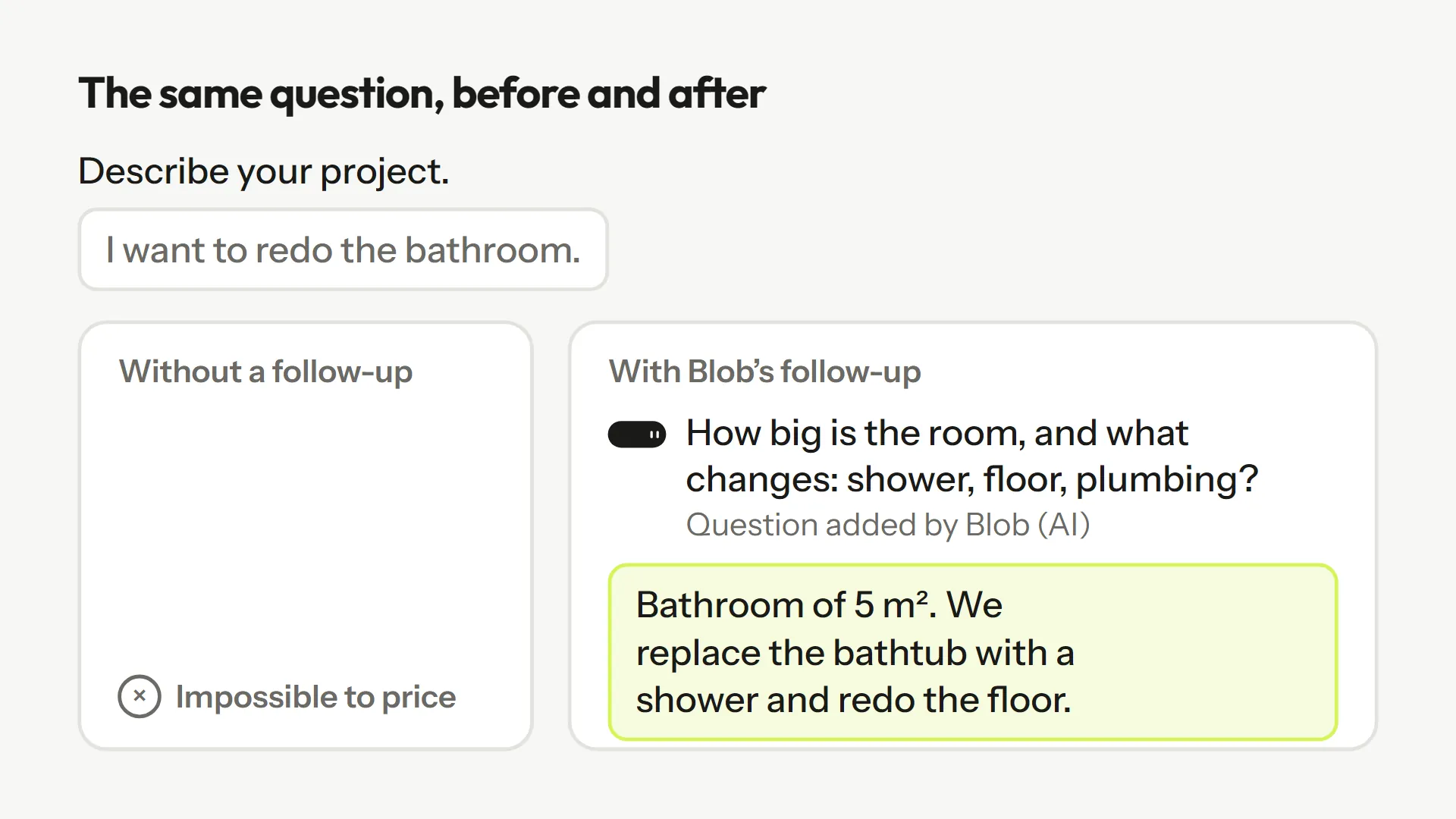
Even with good instructions, some clients type "I want to redo the bathroom" in the description box. You have two options. One: accept the request as is and write to the client. That is what most forms do, and it is the source of the back-and-forth. Two: ask the next question right away, while the client is still looking at the screen.
That is exactly Blob's job in Askwell. On the "Home renovation quote request" template, when someone writes a one-line answer, Blob replies with a question about the size of the room and what changes. The client then gives something like "About 5 sq m, we replace the bath with a walk-in shower and redo the floor and walls." You receive a request you can price, without writing an email. The visitor can always skip the follow-up.
To understand why answers stay vague and what to do about it without AI, read Why your forms get vague answers.
A complete quote form example
| Question | Field type | What it is for |
|---|---|---|
| What is the project? | Choice, then free text | Category to sort, details to price |
| What size / quantity? | Number | Main price factor |
| Where? | City or postcode | Service area, travel |
| For when? | Range or date | Schedule, urgency |
| What budget? | Range (optional) | Fit the offer to the envelope |
| Constraints, photos, plans | Short text + link | Spot surprises before pricing |
| Name, email | Text, email | Reply |
You can start from these questions with the "Home renovation quote request" template or the "Wedding photographer inquiry" template, then adapt them to your trade. For a software or services quote, the "Qualified demo request" template shows the same logic on the B2B side.
Mistakes that cost you requests
- Asking for the full address, date of birth or phone number "just in case."
- One big "Describe your project" box with no instruction at all.
- A budget asked without explanation, or a required budget.
- No confirmation after sending: say when the client will get an answer.
- Questions in an order that ignores how the client thinks: their project first, their details after.
A quote form is never finished. Reread your requests every month: each piece of information you had to ask again is a question to add, each field nobody uses is a field to remove.
Frequently asked questions
There is no magic number. Seven to ten visible fields cover most trades. Each field should match a price factor; other information can be asked after first contact.
It helps tailor the offer, but some clients are wary of it. Offer an optional range and explain in one sentence what it is for.
Rarely. One more required field drives some visitors away. Make it optional and say why you ask.
Ask for a link to a shared folder (Drive, iCloud). It is easier for the client than uploading files and lighter for you to store.
Ask the next question right away rather than by email three days later. A follow-up inside the form, like Blob's, avoids the back-and-forth.
Sources
These pages were opened and read while writing; the quotes come from them.
- Nielsen Norman Group, "Website Forms Usability: Top 10 Recommendations" (Kathryn Whitenton, 2016) : Keep forms short, limit optional fields.
- Baymard Institute, "Checkout Optimization: 5 Ways to Minimize Form Fields in Checkout" (2024) : 11.3 fields on average in a checkout, part of them unnecessary (checkout forms).
- GOV.UK Design System, "Question pages" : Only ask for what you really need.
- Smyth, Dillman, Christian and McBride, Public Opinion Quarterly, 2009 : Answer box size and instructions in open-ended questions of a web survey.
- GDPR, Article 5(1)(c) : Data minimisation.